
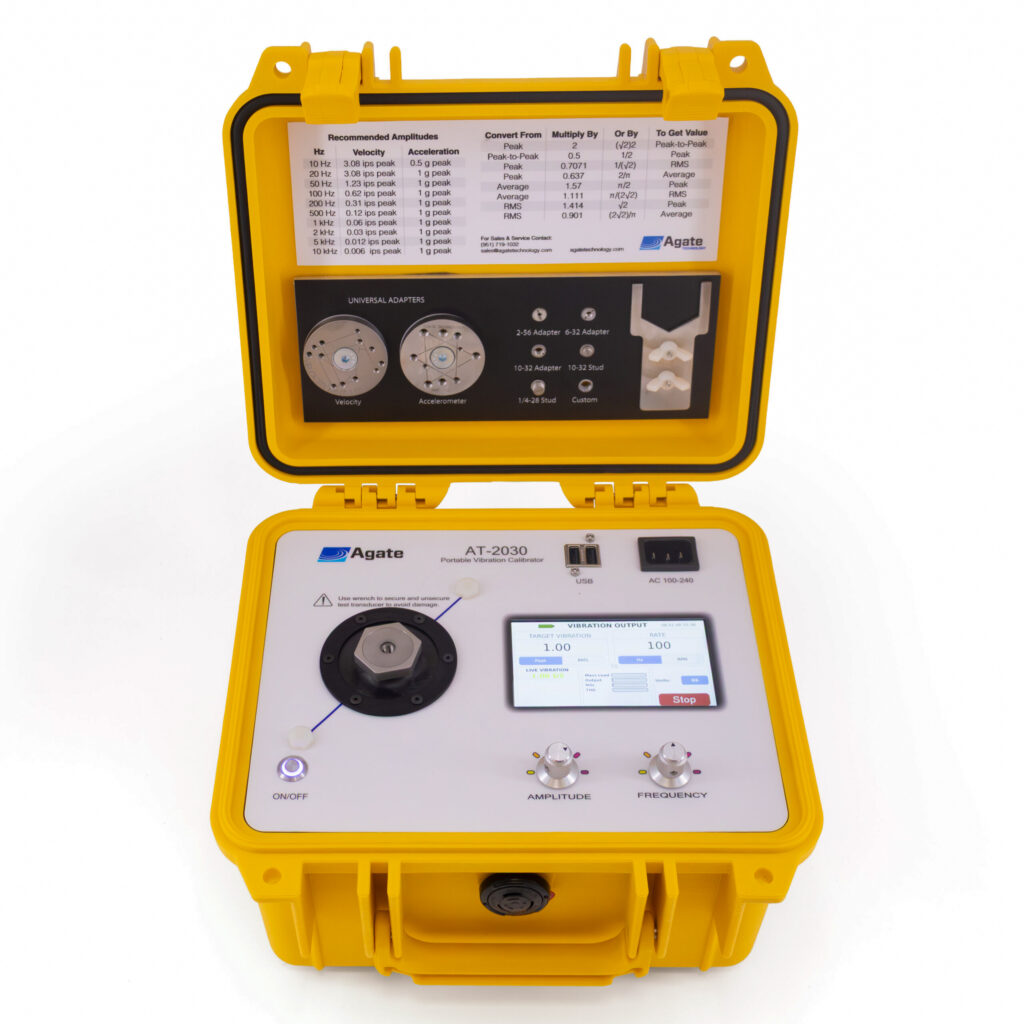
AT2030 Portable Calibration ShakerGen 2 portable vibration calibrator
A portable calibration shaker that produces a known, traceable vibration signal in g's, mils or ips from a battery-powered case you can carry. Calibrate and check accelerometers, proximity probes, monitoring systems and wiring on site, from 5 Hz to 10 kHz, without the complexity of advanced features.
Try the AT2030 right here.
An interactive demo of the AT2030's Vibration Output screen, rebuilt in your browser from the unit's own screen layouts. Demo readings only.
- Tap the Target Vibration or Rate number to type a value, or turn the knobs.
- Pick Units: g, m/s², in/s, mm/s, mils or µm, peak or RMS.
- Press Start. Live vibration settles on your target and turns green.
- Watch Mass Load, Output, Mils and THD as you change level and frequency.
- Tap Sequence to program up to 20 steps of frequency, amplitude and time, then Run. The shaker steps through them on its own, once or on repeat.
A known input, held by closed-loop control.
A quartz reference accelerometer under the shaker head measures the real motion. It's calibrated back-to-back against a laser-calibrated primary reference.
Digital closed-loop control compares that measurement with your target and adjusts the drive, while PureWave™ distortion correction actively cancels up to 30 harmonics, so the level stays put as you change frequency or mount a heavier sensor. Mount your sensor, read it on your own meter, analyzer or monitoring system, and compare it with the level on screen. THD and mass load are shown live, so a loose mount or an overloaded head shows up straight away.
Built for the field, accurate enough for the lab.
Calibrate accelerometers, velocity sensors, proximity probes and drivers, monitoring systems and avionics equipment, and troubleshoot cabling and wiring.
Acceleration
Velocity
Displacement
Program the test once. Let the shaker run it.
Build a test of up to 20 steps, each a frequency, an amplitude and a hold time, then press Run. The AT2030 moves from step to step on its own and holds each level under closed-loop control, so you can watch your meter or monitoring system instead of the dials.
- Build it. Tap Sequence on the Vibration Output screen and fill in the table: frequency (5 Hz – 10 kHz), amplitude in your chosen units, and how long to hold each step (0.1 s to 1 hour).
- Run it. The running step and its setpoint show on screen, and the shaker changes level without stopping between steps.
- Loop it. Tick Repeat to cycle until you press Stop, or let it run once and stop on its own.
- Keep it. Save to one of five slots and load it again for the next sensor, the next shift or the next site.
- Every step is checked against the 0.1 – 20 g pk window before the run starts
- A sequence keeps the units it was written in: g, m/s², in/s, mm/s, mils or µm
- The working sequence is saved automatically and is still there after power-off
- Units are locked during a run, and Stop is always one tap away
Automate it. Drive the AT2030 from a script.
Connect over Ethernet or Wi-Fi and control the AT2030 with plain-text commands from Python, LabVIEW, a test executive or a terminal. Or take over its screen with VNC.
socket, LabVIEW, nc.Limits follow the AT2030 Gen 2 datasheet: 20 g pk, 20 in/s pk, 0.20 in pk-pk.
| Command | What it does |
|---|---|
hello | Connection check. Replies "Hi There!" |
help · version · model | Command list, software version, device model |
frequency <Hz> · frequency? | Set or read the output frequency |
amplitude <value> · amplitude? | Set the target amplitude, or read the measured amplitude |
targetamp? | Read the target amplitude setting |
units <unit> · units? | Set or read units: GS, MSS, IPS, MMS, MILS, MM, UM |
start · stop | Start or stop shaker output |
state | Engine state (idle, running, ...) |
distortion? | Harmonic distortion measurement |
getdata | Combined data: acceleration, distortion, output percentage |
Wait for each reply before sending the next command. Full command list and connection details are in the manual.
Same shaker platform. Choose how much you need.
| AT2030Portable vibration calibrator | AT2040Smart shaker & simulator | |
|---|---|---|
| Platform | Gen 2 | Gen 2 |
| Vibration output | 5 Hz – 10 kHz | 5 Hz – 10 kHz |
| Live display | Vibration level, THD, mass load | Adds sensitivity and bias/gap voltage |
| Sensor inputs | — | ✓ Analog: IEPE, charge, voltage, velocity, proximity probe, 4–20 mA, MEMS (with adapter) |
| Sensor power | — | ✓ 2–24 V, −24 V, +24 V loop |
| Automated tests & certificates | — | ✓ PDF certs, CSV export |
| Signal simulation | — | ✓ 1 Hz – 11 kHz |
| Network remote control | Script commands and VNC, over Ethernet or Wi-Fi | Script commands and VNC, over Ethernet or Wi-Fi |
| Battery | 12 V 6 Ah LiFePO4, ~5,000 cycles | 12 V 6 Ah LiFePO4, ~5,000 cycles |
Need to power and read the sensor itself, run automatic tests or simulate signals? That's the AT2040.
See the AT2040 →The details.
| Performance | |
|---|---|
| Frequency range | 5 Hz – 10,000 Hz (300 – 600,000 RPM), 100 g payload |
| Maximum payload | 800 g (limited to 0.1 in / 2.54 mm peak displacement at low frequency) |
| Waveform | Sine |
| Maximum output | 20 g pk (196 m/s²) · 20 in/s pk (508 mm/s) · 0.20 in pk-pk (5.1 mm), bare table |
| PureWave™ distortion correction | Active harmonic cancellation, corrects up to 30 harmonics |
| Accuracy | |
| Acceleration | ±3.2 % (5 – 9 Hz) · ±2.2 % (10 Hz – < 5 kHz) · ±3.0 % (5 – 10 kHz) |
| Displacement | ±2.2 % (30 – 150 Hz) |
| Amplitude linearity | < 1 % up to 10 g pk (100 g payload, 100 Hz) |
| Waveform distortion | < 1 % THD typical up to 5 g pk (100 g payload, 30 Hz – 2 kHz) |
| Reference | Precision quartz reference accelerometer, laser-calibrated primary reference |
| Readout | |
| Acceleration | g pk, m/s² pk, g RMS, m/s² RMS |
| Velocity | in/s pk, mm/s pk, in/s RMS, mm/s RMS |
| Displacement | mils p-p, mm p-p, µm p-p |
| Frequency | Hz, RPM |
| System | |
| Architecture | Embedded Linux, FPGA-based signal generation and acquisition, 24-bit codec |
| Signal processing | DFT amplitude and phase, real-time harmonic analysis, automatic gain ranging |
| Memory | 16 GB internal, microSD slot |
| Safety | Amplitude limiting by frequency, 200 mils p-p over-displacement protection, automatic shutdown on alarm |
| Network remote control | Ethernet or Wi-Fi · plain-text script commands over TCP · VNC screen control (see how) |
| Power | |
| Battery | 12 V DC, 6 Ah LiFePO4 · 5,000 cycles at 80 % depth of discharge, or 10 years |
| Charging | 1 hour · 100–240 V AC, 50–60 Hz integrated charger, IEC C13 cord |
| Battery life | Up to 18 h low output · ~4–12 h typical testing · ~1 h continuous high output |
| Physical | |
| Display | 4.3" capacitive TFT LCD, 480 × 272, high-brightness, anti-glare |
| Controls | 2 dials and touchscreen |
| Sensor mounting | ¼-28 thread |
| Dimensions (H × W × D) | 10.6 × 9.7 × 6.9 in (27 × 24.6 × 17.4 cm) |
| Weight | 13.0 lb (6.24 kg) |
| Operating temperature | 32 – 122 °F (0 – 50 °C) |
| Certifications, accessories & support | |
| Certifications | A2LA accredited · ISO/IEC 17025:2017 · NIST traceable · ANSI/NCSL Z540 traceable · EMC EN 61326-1 · LVD EN 61010-1 · RoHS |
| Included | Power cable, ¼-28 stud, 10-32 UNF stud, 2-56 UNC, 6-32 UNC and 10-32 UNF adapters, universal velocity and accelerometer adapter discs, short-handle wrench, USB drive with CSV import templates and manual |
| Optional | Proximity probe adapter kit (digital or manual micrometer), Chadwick-Helmuth velocimeter cable, triaxial accelerometer adapter |
| Warranty & support | 2 years, including drift and accuracy · training webinars and email support |
Datasheet, manual & compliance.
AT2030 questions, answered.
What can the AT2030 calibrate?
The AT2030 produces a known, traceable vibration signal in g's, mils or ips for calibrating and checking accelerometers, vibration transducers, proximity probes and drivers, condition monitoring systems and avionics equipment, and for troubleshooting cabling and wiring. You read the sensor on your own meter, analyzer or monitoring system and compare it with the level on screen.
What is the AT2030's frequency and amplitude range?
5 Hz to 10,000 Hz (300 to 600,000 RPM), up to 20 g pk, 20 in/s pk or 0.20 in pk-pk on a bare table, with payloads up to 800 g. Achievable output depends on frequency and payload mass.
How accurate is the AT2030?
Acceleration accuracy is ±2.2 % from 10 Hz to under 5 kHz, ±3.2 % from 5 to 9 Hz and ±3.0 % from 5 to 10 kHz. Amplitude linearity is under 1 % up to 10 g pk, and PureWave™ distortion correction keeps THD typically under 1 %. A precision quartz reference accelerometer and a laser-calibrated primary reference back the readings.
Is AT2030 calibration accredited and traceable?
Yes. Calibration is A2LA accredited to ISO/IEC 17025:2017 and is NIST and ANSI/NCSL Z540 traceable.
How long does the AT2030 battery last?
The 12 V 6 Ah LiFePO4 battery charges in about 1 hour and runs up to 18 hours at low output, about 4–12 hours in typical mixed testing and about 1 hour at continuous high output. It is rated for 5,000 cycles at 80 % depth of discharge, or 10 years.
How big and heavy is the AT2030?
It weighs 13.0 lb (6.24 kg) and measures 10.6 × 9.7 × 6.9 in (27 × 24.6 × 17.4 cm), with a ¼-28 sensor mounting thread.
Can I control the AT2030 remotely or from a script?
Yes. Connect over Ethernet or Wi-Fi and send plain-text commands over TCP from Python, LabVIEW or any TCP client to set frequency, amplitude and units, start and stop the shaker and read back level and distortion. You can also operate the touchscreen remotely with VNC.
Can the AT2030 run a vibration sequence automatically?
Yes. Program up to 20 steps, each with a frequency (5 Hz – 10 kHz), an amplitude and a hold time (0.1 s to 1 hour), and press Run. The shaker steps through them without stopping between steps, once or on repeat until you press Stop. Five sequences can be saved and loaded again.
What is the difference between the AT2030 and the AT2040?
Both are Gen 2 portable vibration calibrators with the same 5 Hz – 10 kHz shaker platform. The AT2030 is a traceable reference vibration source. The AT2040 adds sensor inputs and power, live sensitivity, automated tests with PDF certificates, and signal simulation.
Get AT2030 pricing.
Tell us which sensors you check and where, and we'll send a quote and set up a live demo.