
AT2040 Portable Vibration CalibratorSmart shaker, sensor test set & signal simulator
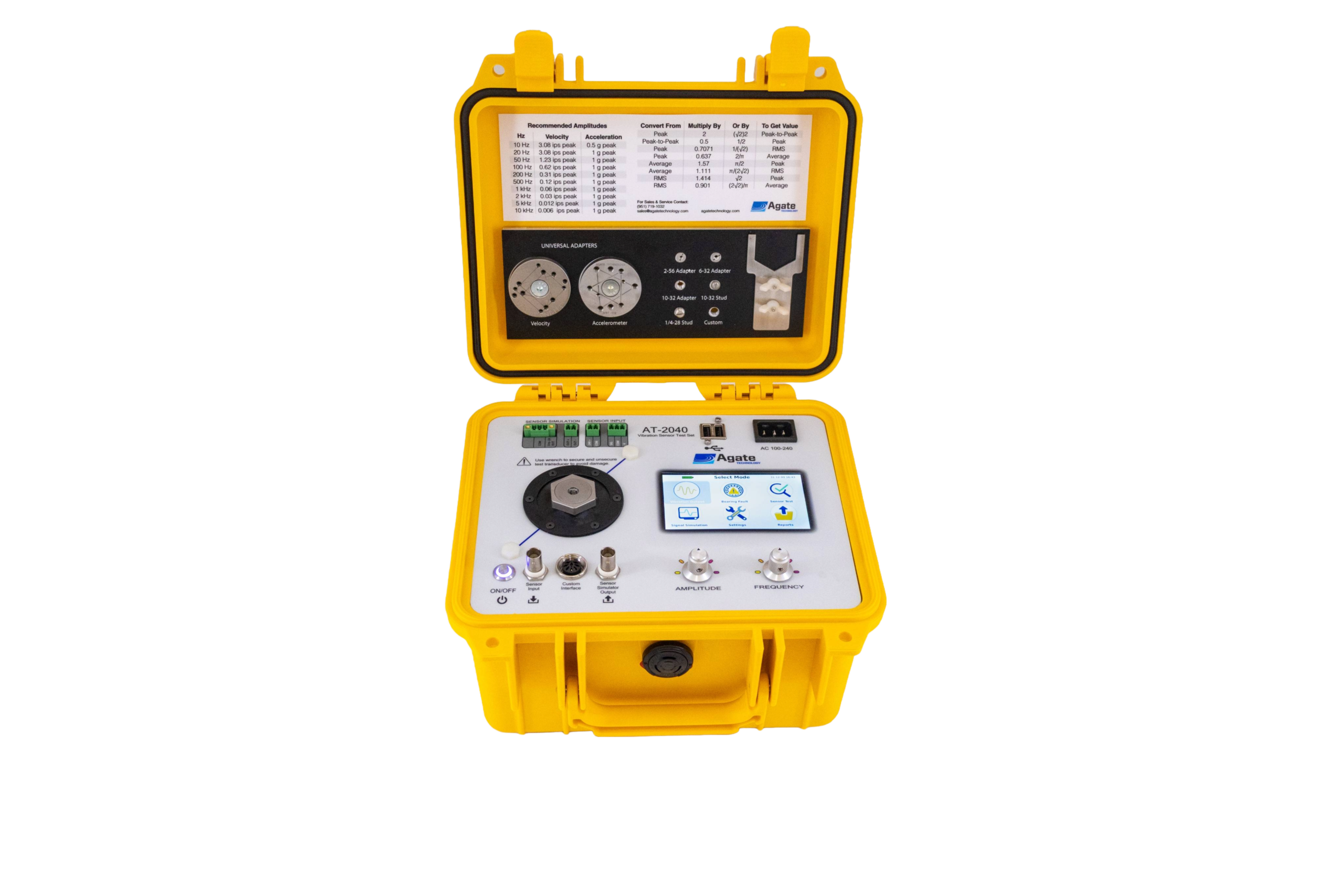
Lab-grade accuracy in the field. The Gen 2 AT2040 calibrates accelerometers, velocity sensors, proximity probes and 4–20 mA transmitters on site, then generates the calibration certificate. A calibration shaker, sensor test set, bearing fault simulator and signal generator in one rugged, battery-powered case.
Try the AT2040 right here.
The AT2040's interface, rebuilt in your browser from the unit's own screen layouts. Tap through it the way you would on the bench.
- Tap any mode on the Select Mode screen. Every mode works.
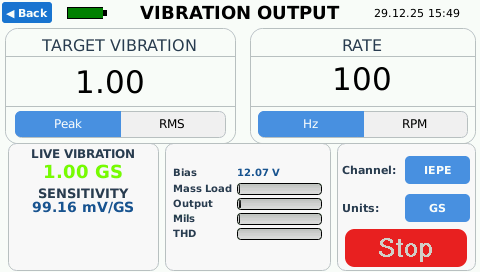
- In Vibration Output, pick a Channel and Units, press Start and watch the sensitivity appear.
- In Sensor Test, pick a sensor and run a full automatic test, then find it in Reports.
- Use the knobs like the real ones: turn to scroll or adjust, press right to select, press left to go back.
It measures the vibration. It doesn't assume it.
Most portable shakers set a drive level and trust it. The AT2040 has its own reference accelerometer under the shaker head that measures the real motion all the time.
Your sensor's output is compared against that measured motion, not against the setting. Mass loading, a loose mount or a bad cable show up on screen straight away, as a change in live vibration, amplifier load or distortion.
Verify sensors. Validate systems. Train technicians.
Vibration Output
Set the frequency and amplitude by hand and see the result straight away. Use it for quick checks, troubleshooting and exploring a sensor before running an automatic test.
Acceleration
Velocity
Displacement
| # | Freq (Hz) | Level (g) | mV/g | Dev |
|---|
Sensor Test
Pick a test, press start. The AT2040 steps through each frequency and amplitude, measures the response and calculates sensitivity and deviation at every point. You don't need a PC, software or a spreadsheet.
- Automatic frequency and amplitude control
- Live sensitivity, bias and deviation
- Repeatable test points with no user input
- PDF certificate and CSV export from the device
Bearing Defect
A real bearing fault is a sharp impact followed by a short ring-down, repeated every time a rolling element passes the defect. The AT2040 produces that same pattern, steadily and repeatably, so you can check alarm thresholds and envelope detection without a damaged bearing.
- Outer race, inner race and cage faults
- Set amplitude, shaft speed and ball count
- Defect frequency calculated from ball count and speed
- Impact transmitter testing coming in 2027

Sensor Simulation
Unplug the sensor and let the AT2040 pretend to be one. Feed a known signal into a monitoring system to check channels, scaling, alarms and cabling without shaking anything.
- Voltage and charge signals, 1 Hz – 11 kHz
- Adjustable 4–20 mA output
- Proximity probe signals
- No external signal generator needed
Make the knocks. Count them too.
Coming to the AT2040 in 2027: generate real impacts on the shaker and read the impact transmitter the way a handheld impact meter does, so you can prove the whole channel end to end, from knock to loop current.
Planned for the 2027 release: an adapter that switches the transmitter between inputs automatically, so you get all three readings without moving wires.
Try it: counting knocks
Coming in 2027 · simulation, illustrative numbersKnock size here is made up for illustration. On a real rig, how drive strength turns into sensor mV depends on the transmitter and how it sits on the table.
Automate it. Run calibrations from a script.
Connect over Ethernet or Wi-Fi and drive the AT2040 with plain-text commands: pick the sensor, run the autotest point by point, and pull back CSV and PDF results. Or take over its screen with VNC.
socket, LabVIEW, nc.| Group | Commands |
|---|---|
| Connection | hello · help · version · model |
| Sensor | sensor <model> · serial <number> · channel <n> · setchannel <n> |
| Test type | autotest · sbs (side-by-side) · mancal · autocal |
| Test control | run · stop · pause · resume · hold · release · nohold |
| Step control | remotehold 0 / 1 · remotehold? · nextstep · stepstatus? (WAITING, RUNNING, STEP_COMPLETE, TEST_COMPLETE, IDLE) |
| Configuration | setfrequency <Hz> · setacceleration <value> · units GS (MSS, IPS, MMS, MILS, MM, UM) |
| Measurements | status · state · getsensitivity · getfrequency · getacceleration · getreference · gettest · gresult |
| Export | results · getcsv · getpdf |
| Shaker output | frequency · amplitude · units (and ? queries) · targetamp? · distortion? · start · stop · getdata |
| Navigation | gotomain · gotosetup · gototest · gotomanual |
Wait for each reply before sending the next command, and retrieve results after the test completes. Full details are in the manual.
Power it, read it or simulate it.
Everything a sensor needs is built in and runs from the AT2040's battery.
Sensor inputs
- IEPE accelerometersmV/g
- Charge accelerometerspC/g
- Voltage accelerometers, AC/DCV/g
- Velocity, piezo & coilmV/ips
- Proximity probes, axial/radialmV/mil
- 4–20 mA transmittersmA
- Piezoresistive & variable capacitanceMEMS adapter
Signal outputs
- Voltage signalvariable f & amplitude
- Charge signalvariable f & amplitude
- 4–20 mAadjustable
- Proximity probeadjustable
- Frequency range1 Hz – 11 kHz
Sensor supplies
- Programmable DC2 – 24 V
- Prox probe drivers−24 V
- Loop-powered transmitters+24 V
- IEPE constant currentbuilt in
The details.
| Performance | |
|---|---|
| Type | Portable vibration calibrator, shaker table, accelerometer & proximity probe signal generator, bearing fault simulator |
| Vibration output | 5 Hz – 10 kHz, variable frequency and amplitude |
| Simulation output | 1 Hz – 11 kHz |
| Operating modes | Vibration Output, Bearing Defect, Sensor Test, Sensor Simulation |
| Test types | Manual sensitivity, sensor simulation, automatic sweep, certification |
| Display | Real-time sensitivity, live vibration, bias/gap voltage, distortion |
| Power & data | |
| Battery | 12 V 6 Ah LiFePO4, about 5,000 cycles |
| Charger | Built-in smart charger, 100–240 V AC |
| Sensor power | 2–24 V programmable · −24 V prox driver · +24 V loop |
| Data output | Onboard logging, PDF certificate generation, CSV export |
| Network remote control | Ethernet or Wi-Fi · plain-text script commands over TCP · VNC screen control (see how) |
| Certifications | |
| Calibration | A2LA accredited, ISO/IEC 17025:2017 · NIST traceable |
| Safety & EMC | LVD EN 61010-1:2010 · EMC EN 61326-1 · CE marked · RoHS |
Extend what it can test.
Proximity Probe Adapter Kit
Probe driver powered from the AT2040 battery. AC and DC voltages shown on screen.
View →MEMS Adapter
Sensitivity readings for piezoresistive and variable capacitance sensors. 1× and 10× conditioners, single and double ended.
View →Mounting Adapters
Studs and adapters to fit common sensor threads to the shaker head.
View →Cables
Sensor cables for the AT2040 inputs.
View →Shaker Verification Kit
Check the shaker's own accuracy between calibrations.
View →Datasheets, manuals & compliance.
AT2040 questions, answered.
What sensors can the AT2040 calibrate?
The AT2040 reads the analog output of IEPE, charge and voltage (AC/DC) accelerometers, piezo and moving-coil velocity sensors, eddy-current proximity probes and 4–20 mA vibration transmitters. Piezoresistive and variable-capacitance MEMS sensors are supported with the MEMS adapter. It also supplies sensor power: 2–24 V programmable, −24 V for probe drivers and +24 V for loop-powered transmitters.
What is the AT2040's frequency range?
Vibration output runs from 5 Hz to 10 kHz. Signal simulation runs from 1 Hz to 11 kHz.
Is AT2040 calibration accredited and traceable?
Yes. Calibration is A2LA accredited to ISO/IEC 17025:2017 and NIST traceable. Annual recalibration is recommended.
Can the AT2040 create calibration certificates?
Yes. Automatic sensor tests produce PDF calibration certificates and CSV data straight from the instrument, with no PC or software needed. The certificate template can be customised with your own layout and company logo.
Can I control the AT2040 remotely or from a script?
Yes. Connect over Ethernet or Wi-Fi and send plain-text commands over TCP from Python, LabVIEW or any TCP client to select sensors, run autotests step by step and export results. You can also operate the touchscreen remotely with VNC.
Can the AT2040 simulate bearing faults?
Yes. Bearing Defect mode generates outer race, inner race and cage fault impulses. You set the amplitude, shaft speed and ball count, and the unit calculates the defect frequency.
What battery does the AT2040 use?
A 12 V 6 Ah LiFePO4 battery rated for about 5,000 charge cycles, with a built-in 100–240 V smart charger.
What is the difference between the AT2030 and the AT2040?
Both are Gen 2 portable vibration calibrators with the same 5 Hz – 10 kHz shaker. The AT2030 is a traceable reference vibration source. The AT2040 adds sensor inputs and power, live sensitivity, automated tests with certificates, and signal simulation.
Get AT2040 pricing.
Tell us which sensors you test, and we'll send a quote and set up a live demo.