
The AT2040 is designed to fit directly into automated test systems, calibration labs, and production workflows.
Using simple plain-text commands over TCP/IP or serial communication, your software can control the shaker output, read live analyzer measurements, export data, and generate records without relying on a proprietary software environment.
Whether your team works in Python, C#, LabVIEW™ software, shell scripts, or a custom test executive, the AT2040 gives you a clean command interface for automating vibration calibration.
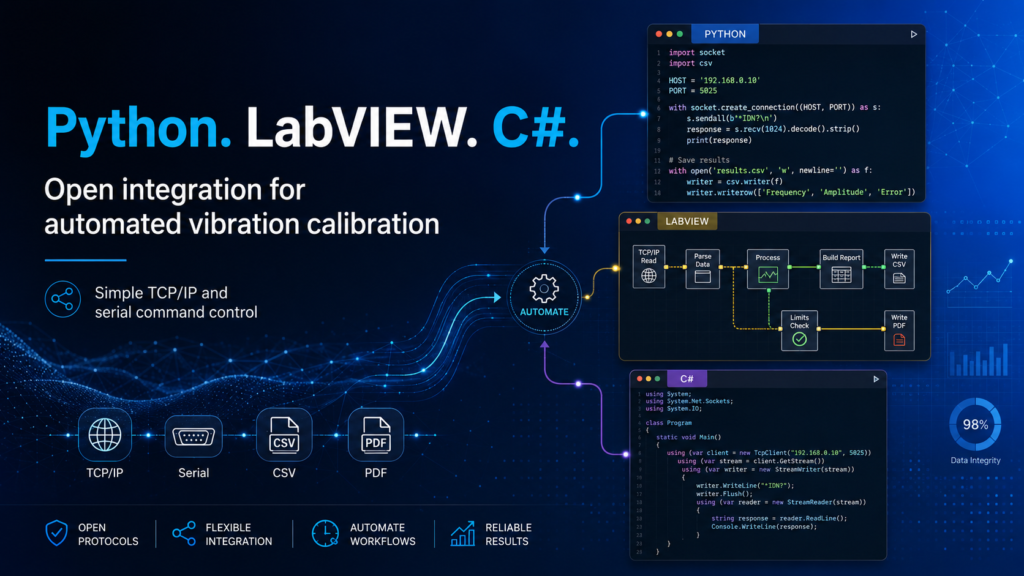
With the AT2040 remote interface, a program can send commands to control vibration while reading measurement feedback from the analyzer during the same test process.
This allows the AT2040 to become part of a larger automated workflow instead of being limited to manual front-panel operation.
Set frequency, amplitude, and signal source from your software.
FREQ 100
AMP 0.5Read reference acceleration and transducer response during the test.
REFG
TUTGSave CSV data and generate PDF certificates directly from the instrument.
EXPORTCSV
EXPORTPDFThe command structure is intentionally readable, making it easier to test, troubleshoot, and automate from common programming environments.
The AT2040 interface uses a human-readable command language available over standard network or serial connections.
FREQ 100
AMP 0.5
REFG
TUTG
EXPORTCSV
EXPORTPDFThe AT2040 does not require a closed software package to communicate with the instrument. Any programming environment that can open a TCP socket or serial port can send commands and read responses.
Python is ideal for engineering benches, quick test scripts, automated sweeps, and data logging.
A Python script can set the vibration level, wait for readings to settle, read live values, calculate sensitivity, and export results.
dev.cmd("FREQ 100")
dev.cmd("AMP 0.5")

ref_g = dev.value("REFG")
tut_v = dev.value("TUTG")

sensitivity = (tut_v / ref_g) * 1000

dev.cmd("EXPORTCSV")
dev.cmd("EXPORTPDF")
C# is commonly used for production applications, barcode workflows, database-connected test stations, and MES or quality-system integration.
A C# application can guide the operator through the test, scan the sensor serial number, start the AT2040 sequence, read the measured result, apply pass/fail logic, and save the data automatically.
For teams using graphical test systems, the AT2040 can be controlled from LabVIEW™ software by sending ASCII commands through a TCP/IP or serial connection.
A test panel can send a command, read the response, display live values, and log the results as part of a larger automated measurement system.
The same command approach can be used over network or serial communication, allowing engineering teams to write one workflow and use it in multiple environments.
Connect the AT2040 to a lab or production network and control it from a workstation, server, or automated test application.
For direct benches, isolated systems, secure environments, or legacy test setups, the same command style can be used over a serial connection.
Remote control is not limited to setting frequency and reading measurements. The AT2040 can also support automated data movement, helping reduce manual handling, improve record consistency, and simplify integration with internal quality systems.
A sensor manufacturer or calibration lab can use the AT2040 as part of an automated test station. The operator mounts the sensor and scans the serial number. The software then controls the rest of the process.
This reduces operator time, avoids transcription errors, and keeps measurement records tied directly to the instrument output.
The AT2040 remote interface is useful anywhere vibration calibration needs to be repeatable, scriptable, and connected to a larger test or quality workflow.
Script repeatable calibration sequences and export results directly into your records system.
Use software to control the test sequence, collect results, and apply consistent pass/fail logic.
Automate end-of-line accelerometer verification before shipment.
Use Python, C#, LabVIEW™ software, or another environment to build custom workflows around the AT2040.
Export CSV files, PDF certificates, and setup files for documentation and traceability.
| Capability | Detail |
|---|---|
| Programming environments | Python, C#, LabVIEW™ software, shell scripts, custom test software |
| Communication | TCP/IP or serial command interface |
| Command style | Plain-text ASCII command and response |
| Shaker control | Frequency, amplitude, source selection |
| Measurement readback | Reference level, transducer level, sensitivity, status |
| Data export | CSV data, PDF certificates, setup files |
| Best fit | Calibration labs, production lines, sensor manufacturers, automated test benches |
Control the shaker, read the analyzer, calculate results, and export records from the programming tools your team already uses.
LabVIEW is a trademark of National Instruments. Agate Technology is not affiliated with, endorsed by, or sponsored by National Instruments. All other trademarks are the property of their respective owners.
